What Are a-Contacts and b-Contacts? Sequence Control Basics
Try the contact-logic exercise on this page, no sign-in ↓
Sequence control means a circuit makes decisions in a fixed order — *"input arrives → the circuit decides → an output fires."* Traffic lights, elevators, and motor starters all follow the same pattern. Every public problem on the Korean Electrician practical exam is built on this flow, so let's start where it starts: the supply, contacts, and push-buttons.
The supply — three phases plus PE, and color
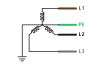
- L1 brown · L2 black · L3 gray — together the three lines form a three-phase supply, creating the rotating magnetic field that turns a motor's shaft.
- PE (protective conductor) — provides a fault-current path that supports protective disconnection. PE alone does not guarantee protection from shock and is not neutral N.
The full wire-color rule by circuit type is covered in Wire color & terminal rules.
a-contacts and b-contacts — the circuit's on/off
Every decision in sequence control reduces to *"is this contact closed or open?"* There are two basic types.


- a-contact (NO) — open at rest, closes when pressed. Used for start / run signals.
- b-contact (NC) — closed at rest, opens when pressed. Used for stop. (This is why the stop in a self-hold circuit is a b-contact.)
Push-buttons — momentary, and the color convention
The push-button in this example is a spring-return (momentary) contact: it acts only while held, and the internal spring snaps it back the instant you let go. Usefully, one button body houses both contacts at once — the top two terminals (NO) are the a-contact, the bottom two (NC) are the b-contact.
Read colors with the specific circuit diagram; these are example assignments:
- Red button (PB0) = stop, green button (PB1) = start / normal.
- Indicator lamps follow the same rule — red = run/fault, green = stop/normal, yellow = warning, white = power applied.
See it work


- Hold the green button (PB1) and its a-contact closes, lighting the green lamp (GL).
- Hold the red button (PB0) and its b-contact opens, darkening the red lamp (RL).
- Let go and the spring returns the contacts to rest.
Next
A button only acts while held. To keep something running after you let go, you need a relay. Next up: the 8-pin relay — how a coil moves its contacts — and the self-holding circuit you build from it.
Try it yourself
Open the practical project list →
Check your understanding
Question: What changes when an NO lamp contact is replaced with NC?
Answer: For an otherwise complete lamp circuit, NO lights while pressed; NC extinguishes while pressed. The name describes the resting state.
Practice path and references
The practical project list may require sign-in. Create a project, choose a task and place the relevant components, then compare the contact/wiring paths explained here. The link does not preload a specific completed circuit.
Reference: Q-Net public-problem notice, 2025-08-04 edition, problem 14 pages 11-1 to 11-4 (work/wiring instructions) and 11-9 (component diagrams). Read the original for each task and any amendments. Site examples are distinct from general installation design requirements.
Test the contact logic here
Open the interactive exercise below →. No sign-in is needed; the instructions and results explain exactly which part of the circuit is being modeled.
Try without signing in: Compare NO and NC
Click START once to press and again to release. Compare NO and NC contacts in otherwise complete lamp circuits.
A contact-logic learning model, not a hardware wiring or ratings check. Active buttons are highlighted.
- NO
- OFF
- NC
- ON
Read the holding-path explanation · Open the homepage wiring simulator